

What is HTTP ?
HTTP is the foundation of data communication on the web.

Welcome to Hello Engineer, your weekly guide to becoming a better software engineer! No fluff - pure engineering insights.
You can also checkout : What are Microservices ?
I would like to know what type of content you want in the future. It will help me to create the right content for you 👇
What is HTTP?
HTTP is a set of rules that allow computers to talk to each other over the internet.
When you open a browser and visit a website, like www.google.com, your browser sends a message to Google’s servers saying:
“Hey! Can you show me the homepage, please?”
And Google replies with:
“Sure! Here’s the content you asked for.”
This whole conversation happens using HTTP.
Think of HTTP as the language your browser uses to request data, and your server uses to respond.
Two important traits make HTTP what it is:
Connectionless
Stateless
Real World Analogy: Ordering a burger…
Imagine walking into a fast-food restaurant:
You walk to the counter.
Place your order for a cheeseburger.
Get the burger.
Walk away.
The cashier doesn't remember you, nor does she keep the connection open for future orders.
Every time you want something new, you go back and repeat the whole process.
That’s HTTP.
🍽 Connectionless → You don’t keep the line open after getting the burger.
🧠 Stateless → The cashier doesn’t remember your last order.
How HTTP Works (Step-by-step)
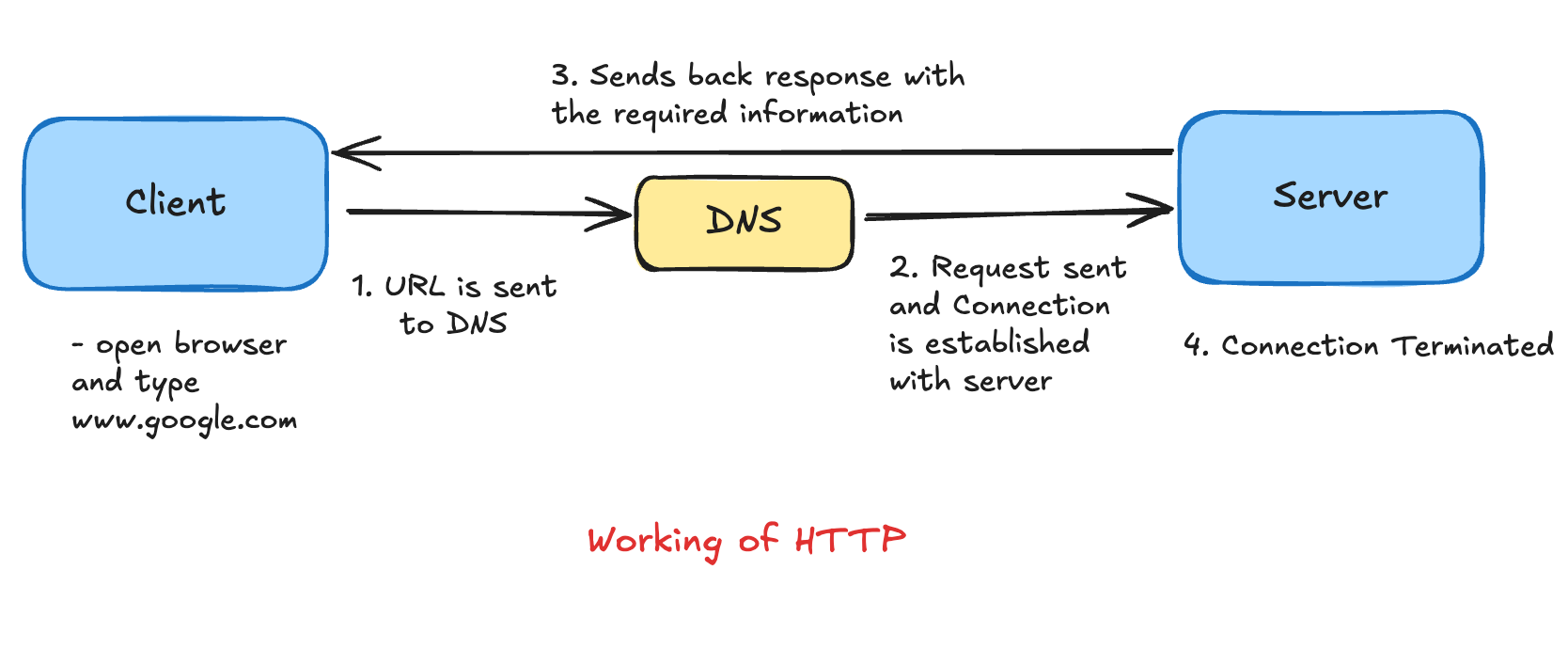
Here’s how HTTP works when you open a website like google.com:
You type the URL in your browser.
Browser contacts DNS to find the actual IP address.
Browser sends an HTTP request to the server at that IP.
Server sends back an HTTP response — containing the website content.
The connection closes.
Want to visit another page? → Repeat from step 3.
It’s like sending a letter and getting a reply, no ongoing call, no memory.
HTTP is Stateless - But Why Does Google Remember Me?
If HTTP is stateless, how does Google remember you're logged in?
💡 Answer: Cookies
Cookies are small text files that your browser stores.
Here’s how they work:
You log in to a site → Server sends back a cookie with your login info.
That cookie is saved in your browser.
Next time you visit the site, your browser sends that cookie back → Server recognizes you!
So even though HTTP doesn’t remember you, cookies help websites remember who you are.
HTTP Methods - How You Interact with the Server
Think of HTTP Methods like the different actions you can perform in a conversation:
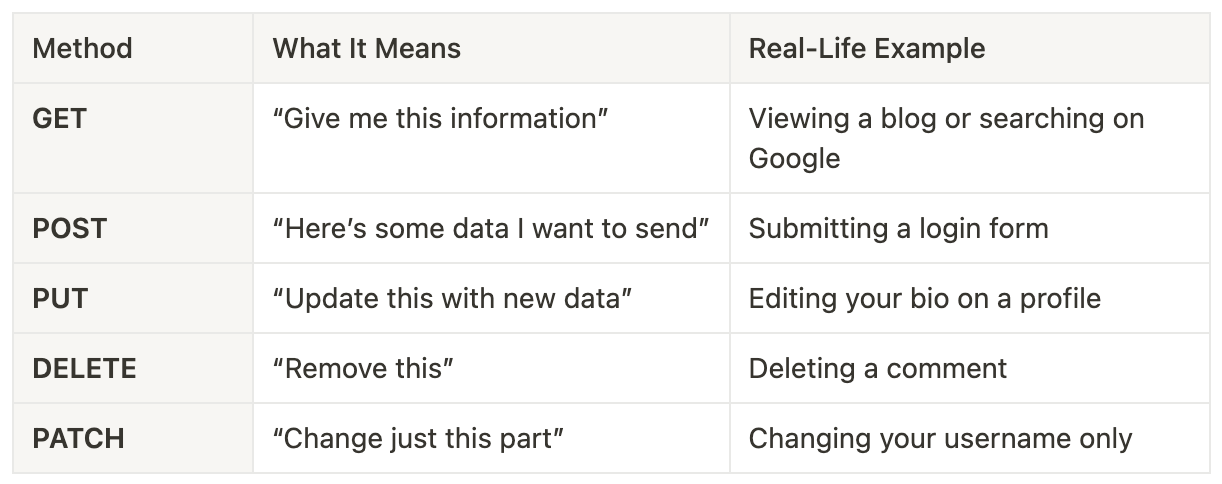
The browser uses these methods to talk to the server and get things done.
HTTP Status Codes - Messages From the Server
When your browser makes a request, the server replies with a status code to indicate what happened:
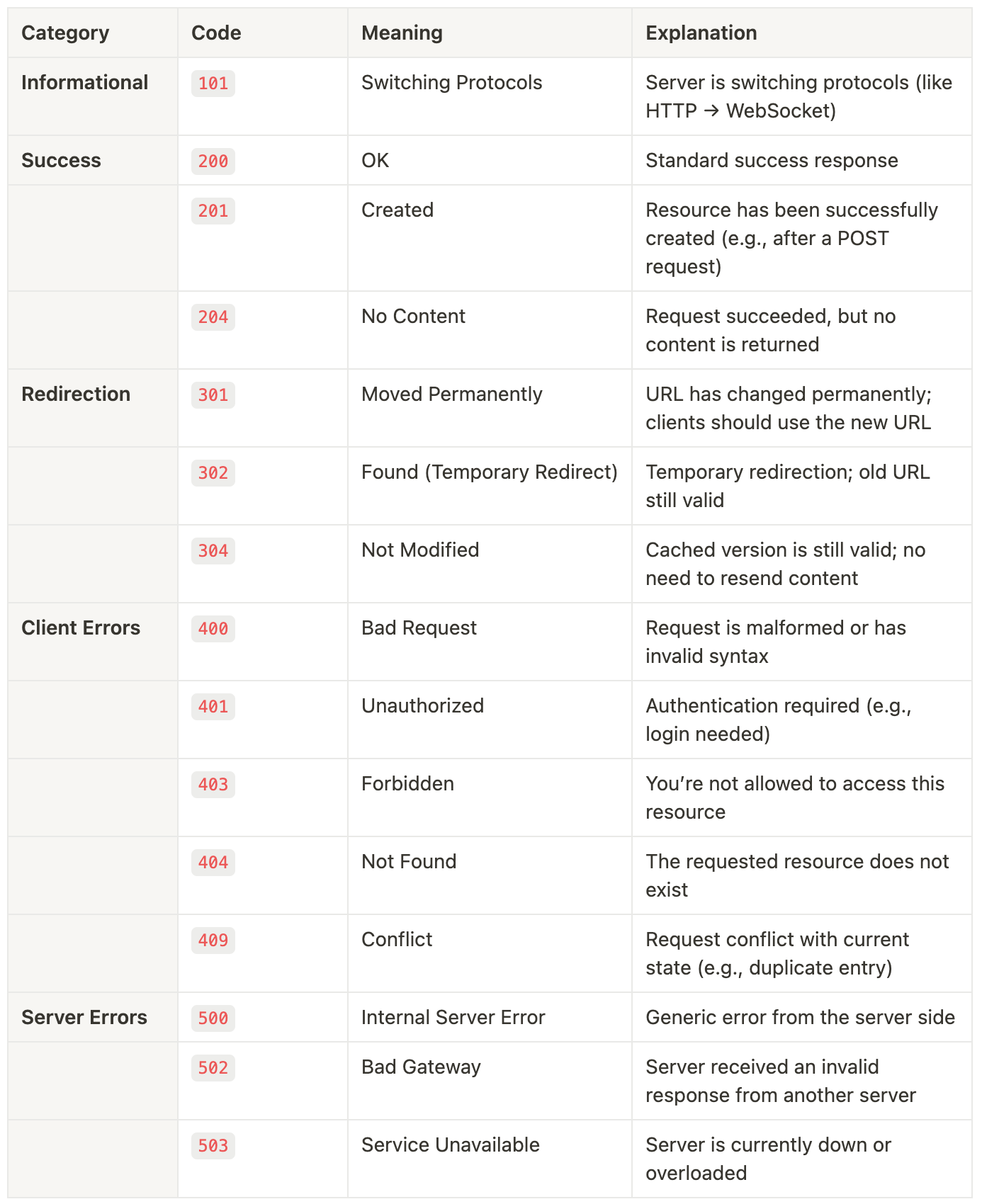
These codes help developers understand what’s going wrong when something doesn’t load properly.
Advantages of Using HTTP
Fast and lightweight – It doesn’t use much memory or CPU.
Simple to implement – Easy for both clients and servers to work with.
Low network load – Fewer connections = less internet traffic.
No session tracking – Great for quick, one-time requests.
Supports pipelining – Can send multiple requests without waiting.
Limitations of HTTP
Not secure – Sends data in plain text (hello hackers 👀).
Not mobile-friendly – Doesn’t handle mobile networks well.
Poor for sensitive data – No encryption = risky for logins, payments, etc.
Uses more power – Long data transfers can be resource-heavy.
One request at a time – Server can get stuck waiting on slow clients.
HTTP vs HTTPS - What’s the Real Difference?
Imagine you're writing a postcard (📬).
Anyone who handles it can read everything you wrote. That’s how HTTP works — your data travels openly, without any protection.
Now imagine locking that postcard in a box 🔒 before sending it.
Only the person with the key can open and read it. That’s HTTPS — it encrypts your data, so no one else can read it, even if they intercept it.
How HTTPS works ?
HTTPS uses security tools called SSL and TLS to scramble (encrypt) your data before sending it.
Only the website you're talking to can unscramble (decrypt) it.
This ensures a private and secure connection between you and the website.
The website also proves it’s trustworthy using something called an SSL certificate — like a digital ID card.
Why HTTPS is Better ?
Secure Communication – Your data is locked while in transit.
Data Integrity – It ensures your data isn’t changed or tampered with.
Privacy – No one can snoop on your personal info.
Performance – Modern HTTPS is fast and efficient.
Trust – Browsers now mark non-HTTPS sites as “Not Secure.”
Quick Dev Tip
Open DevTools → Network Tab in your browser
👉 Load any site
👉 You’ll see every HTTP request, method, and status codeExplore it. You will learn a lot.
Wrapping Up!
HTTP might seem like a technical detail, but it’s everywhere.
Every browser, API call, and website you interact with uses HTTP under the hood.
So the next time someone says “this API is broken”. Remember: it’s probably just an HTTP request gone wrong. 😉
Loved this deep dive? For more simple explanations, useful insights on coding, system design, and tech trends, Subscribe To My Newsletter! 🚀
See you next Week with more exciting content!
Here's Something Extra for You: Exciting Job Openings 🚀
System Performance Engineer @Google:
https://www.linkedin.com/jobs/view/4131721557Software Engineer, Product @Meta:
https://www.linkedin.com/jobs/view/4142048795Software Engineer 1 @Dell:
https://www.linkedin.com/jobs/view/4145776983Software Engineer @LinkedIn:
https://www.linkedin.com/jobs/view/4135579811Software Engineer @Microsoft:
https://www.linkedin.com/jobs/view/4099719491Software Engineer - Frontend @HackerEarth:
https://www.linkedin.com/jobs/view/4143880403Software Developer 3 @Oracle:
https://www.linkedin.com/jobs/view/4104207974Software Development Engineer - II - Frontend @Meesho:
https://www.linkedin.com/jobs/view/4144401401
Thanks for the dive 😅