

ElasticSearch 101: Part 2
Under the Hood: How Elasticsearch Really Works


Welcome to Hello Engineer, your weekly guide to becoming a better software engineer! No fluff - pure engineering insights.
You can also checkout : Elasticsearch 101: Part 1
Don’t forget to check out the latest job openings at the end of the article!
In Part 1, we explored the basics of Elasticsearch, what it is, how you use it, and how it fits into modern systems. Now, let’s take a peek under the hood.
Okay, so you know how searching through tons of stuff online is usually pretty quick? Elasticsearch is a big reason for that. Now, Elasticsearch is cool on its own, but it's built on top of something even cooler: Apache Lucene.
Think of Lucene as the real engine for searching – it's super-fast at the nitty-gritty stuff. Elasticsearch is like the person managing that engine, making sure it runs smoothly when you have lots of different parts working together. It handles all the behind-the-scenes stuff like keeping your search setup organized (that's the "cluster"), giving you easy ways to talk to it, doing calculations across all your data, and making sure you get results right away. Lucene does the actual searching, but Elasticsearch makes it work for big, complex setups.
There's a lot to talk about, but let's start with how an Elasticsearch setup (a "cluster") is organized. Then we can look at how it gets your information ready to be searched and how it actually finds what you're looking for.
The Different Helpers: Node Types
Elasticsearch likes to work as a team, so you usually have a bunch of servers running together – we call these "nodes." When you start Elasticsearch, you're basically starting up a few of these helpers. Each helper can have a specific job. Here are the main roles:
Master Node: This is like the team leader. It's in charge of the whole operation – adding or removing helpers, and creating or getting rid of your search collections (we call them "indices").
Data Node: These are the ones who actually hold all your information. If you have a lot of stuff to search, you'll have a lot of these helpers.
Coordinating Node: This is the friendly face that takes your search requests and then talks to the other helpers to get you the answers. It's like the person you first talk to.
Ingest Node: This is the one who gets your information ready. It takes your raw data and prepares it so the Data nodes can store and search it easily.
Machine Learning Node: This helper does any of the fancy computer learning stuff you might want to do with your data.
All the different "helpers" in Elasticsearch - like the ones that prep data (Ingest), store it (Data), or handle queries (Coordinating) - work together like a well-organized team. Imagine the Ingest helpers cleaning up raw data and handing it off to the Data helpers, who carefully store it away.
The cool part? One server can wear multiple hats! A single server might act as the team leader, a friendly receptionist, and a storage unit all at once. But in larger setups, it's common to split the roles across multiple machines. For example, data prep might need a lot of CPU power, while storing tons of data requires disk space.
It gets even more organized—data can be split based on how often it’s needed:
Hot data: used all the time, super fast access.
Warm data: accessed occasionally.
Cold data: rarely touched.
Frozen data: almost never used, but still there just in case.
This structure helps Elasticsearch balance performance and cost really well.
Data Nodes: Where the Searching Happens
The Data helpers in Elasticsearch are the ones doing the heavy lifting - they safely store your documents and make them lightning-fast to search. How? By keeping two things:
The original data (your full documents)
The Lucene-powered indexes (think: smart shortcuts for searching)
Imagine you’re in a library. The actual books are your documents, and the index at the back of each book helps you jump right to the good stuff. That’s how search works in Elasticsearch.
When you run a search, two steps kick in:
Query phase: Elasticsearch uses those Lucene indexes to quickly find which documents match your search.
Fetch phase: Then it pulls the actual document content from the Data helpers so you can read it.
Now, inside these Data helpers live your indices - basically organized folders of documents. These indices are split into shards (smaller chunks), and each shard can have one or more replicas (backups). And each shard has its very own Lucene index inside, like mini search engines inside your main search engine.
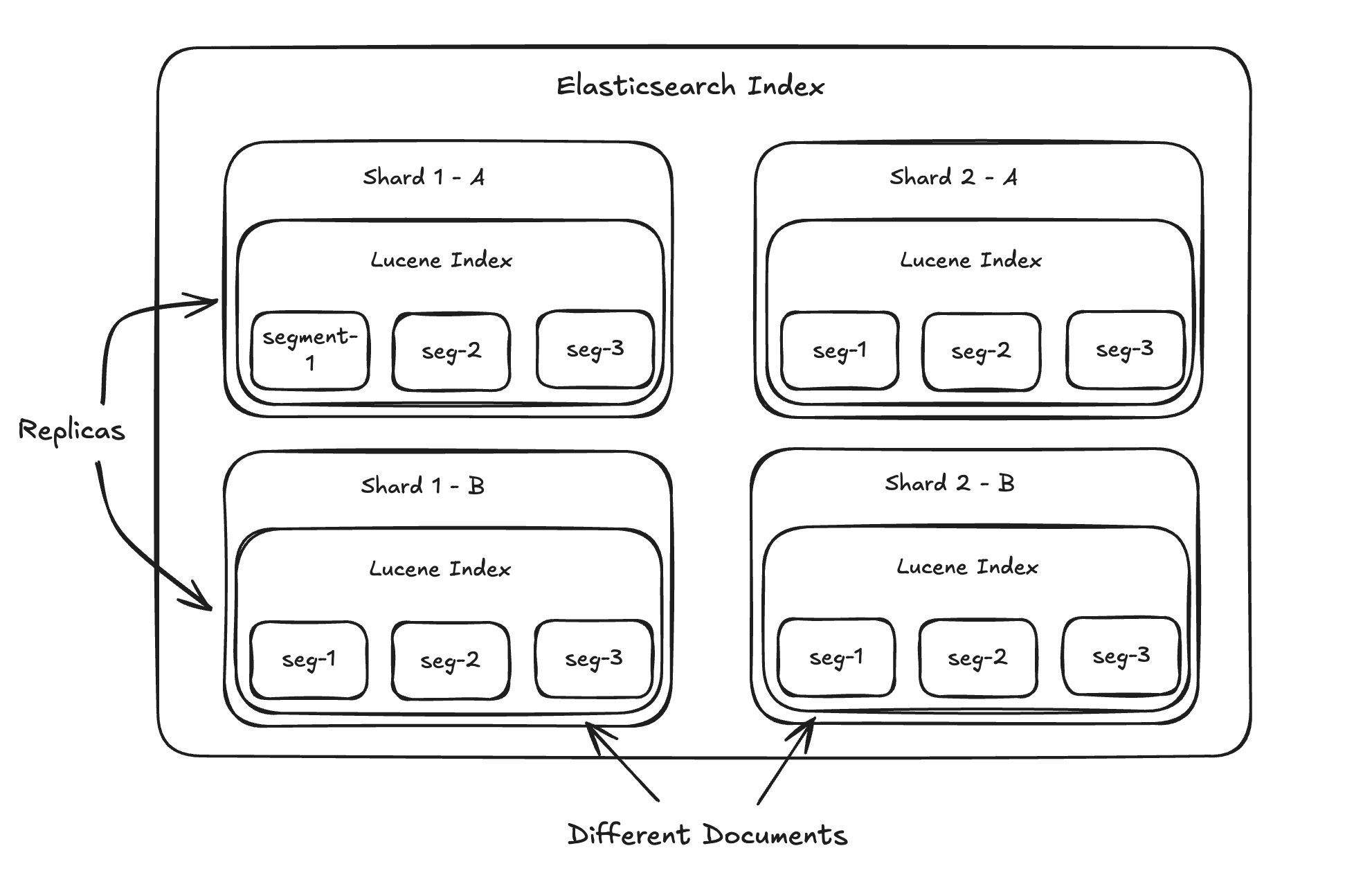
"Sharding" is what lets Elasticsearch spread your information (and those search shortcuts) across multiple servers. This is what makes it really fast and able to handle tons of data. When you search, Elasticsearch can ask all the relevant parts at the same time, and then the friendly face helper puts all the answers together for you.
Now, about those "replicas." They're just exact copies of your shards. Why have copies? Two main reasons:
Keeping Things Running: If one of your servers has a problem, the copy can jump in and make sure you can still access your information. It's like having a spare tire.
Handling More Searches: If one part can handle, say, 10 searches at once, then having a copy means you can probably handle 20 at once (roughly speaking). It's like having more checkout lanes at a store.
Lastly, remember that each of those Elasticsearch parts (shards) has its own little Lucene search engine inside. So, a lot of what Elasticsearch does with these parts – like putting smaller pieces together, making them fresh, and of course, searching – is really just telling the Lucene engines inside what to do.
Lucene's Building Blocks: Segments
Think of a Lucene index as being made up of smaller chunks called "segments." These segments are the basic units our search engine works with. Now, here's a key thing to wrap your head around: once a segment is created, it can't be changed. Let that sink in for a sec. You might be thinking, "Wait a minute, don't we constantly add, update, and delete stuff in our Elasticsearch data?" Good question!
The way Lucene handles this is by being clever with how it writes. When you add a new document, it doesn't go straight into an existing segment. Instead, it gets bundled up with other new documents. Once there's a little batch of them, Lucene creates a brand new segment and writes all those documents into it. It's like collecting your dirty laundry and then doing a whole load at once, rather than washing each sock individually.
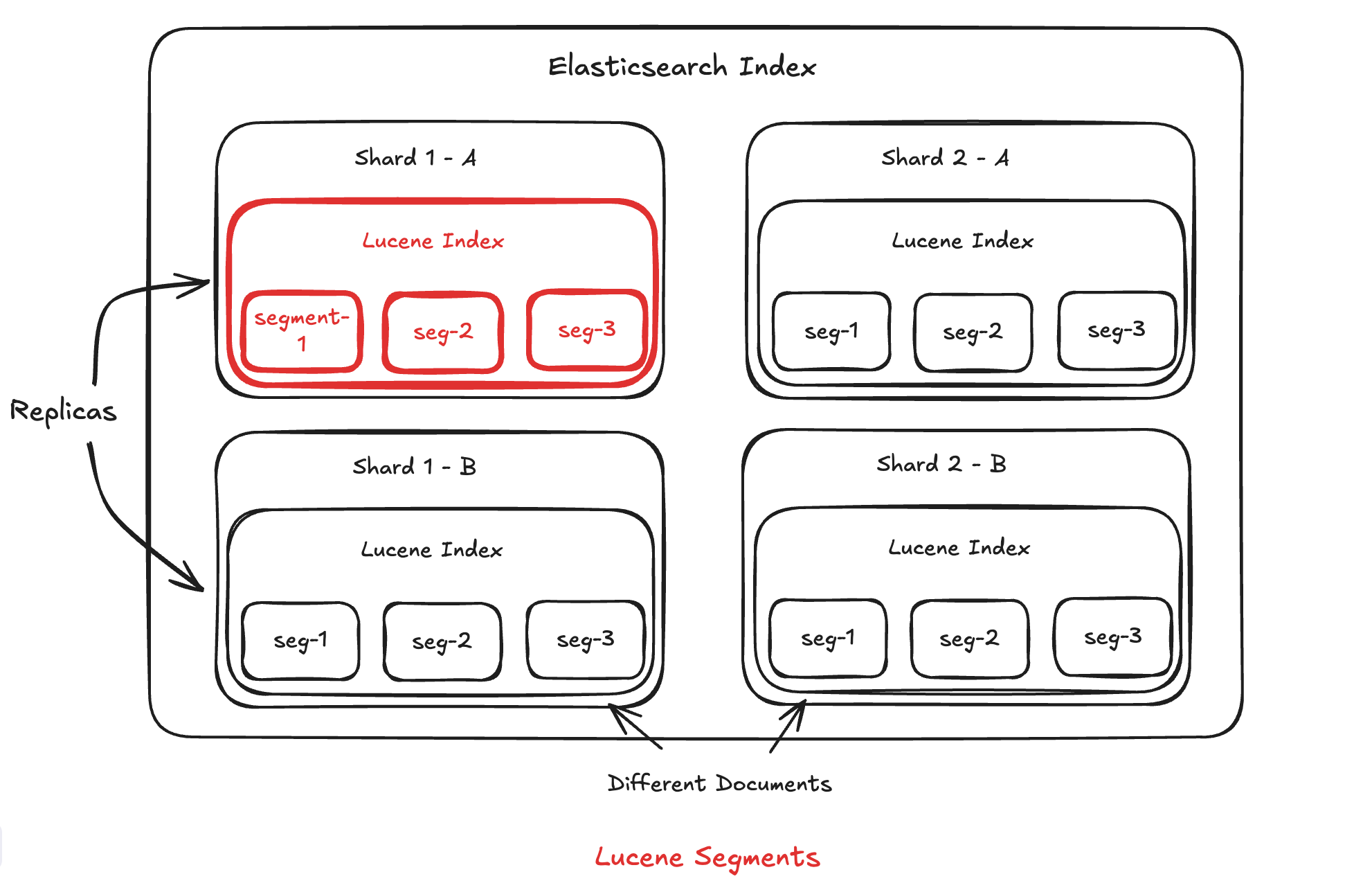
Now, what happens when you have a ton of these segments? It can get a bit messy. So, Lucene has a process to merge them. It takes a few segments, combines them into a new, bigger segment, and then gets rid of the old smaller ones. It's like taking a bunch of small piles of papers and combining them into a few larger, more organized stacks.
When you delete a document, Lucene doesn’t erase it right away. Instead, it marks it as "invisible"—like sticking a Post-it note that says "ignore this one." The actual data is still there until Lucene later cleans it up during segment merges.
Updating is even trickier! There’s no in-place update. Instead, Lucene marks the old version as deleted and adds the new version as a brand-new document. So technically, every update is a delete + insert behind the scenes.
This makes both deletes and updates really fast—at first. But over time, too many of them can slow things down until Lucene merges and tidies things up. So go easy on those frequent updates!
This "can't change once it's written" approach (we call it immutability) actually has some pretty cool benefits for Lucene:
Faster Writing: Adding new stuff is quick because it just goes into new segments without messing with the old ones.
Efficient Caching: Since segments never change, the system can safely keep copies of them in memory (like a super-fast shortcut) without worrying that the data will become outdated.
Simpler Coordination: When you're searching, the system doesn't have to worry about the data changing while it's in the middle of looking. This makes things much simpler when lots of people are searching at the same time.
Easier Recovery: If something crashes, it's easier to get back up and running because the segments are in a consistent, known state.
Better Compression: Data that doesn't change can be squeezed down more effectively to save disk space.
Quicker Searches: The unchanging nature of segments allows for some really clever and fast ways to organize and search the data.
What's Inside These Segments?
Segments aren't just dumb containers holding your documents. They also have some super smart data structures inside that make searching really fast. Two of the most important ones are the inverted index and doc values.
The Inverted Index: The Heart of Fast Search
If Lucene is the heart of Elasticsearch, then the inverted index is definitely the heart of Lucene. Basically, if you want to find things quickly, you have a couple of main strategies:
Organize your data based on how you want to find it. For example, if you want to quickly look up a specific book by its ID, a simple list where you have to check every book (O(n) – that's computer science speak for "slow for lots of books") would be bad. A sorted list (O(log(n)) – better) would be okay, but a hash table (O(1) – super fast!) would be ideal.
Make a copy of your data and organize that copy in a smart way (like in point 1).
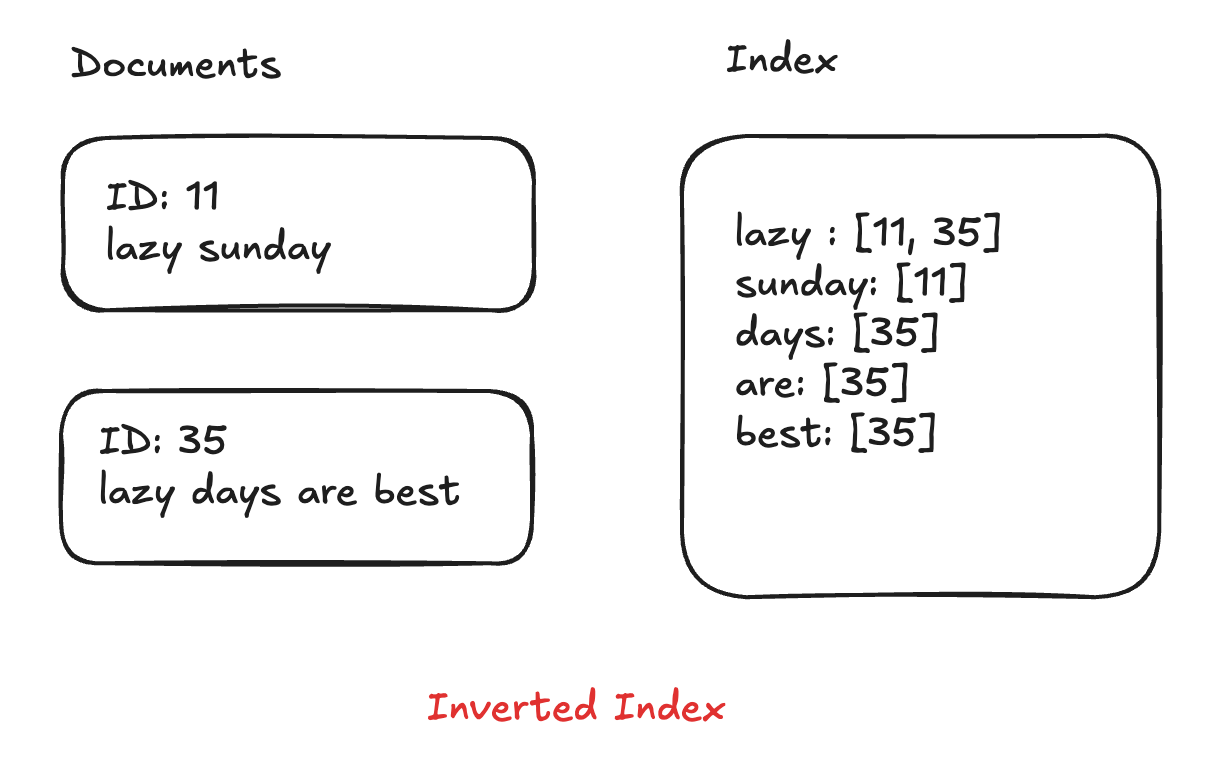
Let's say you have a billion books, and only a few of them have the word "great" in the title. How would you find those books as fast as possible?
An inverted index is like a special kind of index that maps words (or numbers, etc.) to where they appear in your data (in our case, which documents they're in). This is what makes keyword search with Elasticsearch so speedy. It lists every unique word that appears in any of your documents and then tells you exactly which documents contain that word. So, for our "great" example, the inverted index would have an entry like:
"great" -> [document #12, document #53, ...]Now, instead of having to look through every single book to see if the title contains "great," we can just look up "great" in our inverted index and BAM! We instantly know which documents have it.
Doc Values: For Sorting and More
When you want to sort search results, say by price - Elasticsearch uses something called doc values to keep things fast.
Instead of scanning every full document just to get one field (like traditional row-based databases), Elasticsearch stores field values like "price" in a columnar format. This means all the prices are stored together, all the authors together, and so on.
So when you search for books with "great" in the title and want to sort them by price, Elasticsearch can quickly grab just the price values from memory, sort them, and return the results—without touching the rest of the document. Efficient and speedy!
Coordinating Nodes: The Traffic Cops
Remember how Elasticsearch is like a team of servers? Well, coordinating nodes are the traffic cops of that team. When you send a search request, they’re the first to receive it. Their job is to figure out which servers (nodes) need to help answer the query, send out those requests, and then gather all the results and stitch them together for you.
One of their biggest responsibilities is query planning—basically, choosing the smartest, fastest way to get your answer. Think of it like them plotting the most efficient route on a GPS before you hit the road. After the coordinating node understands what you're asking for, the query planner figures out things like:
Should we use the inverted index?
If our search has multiple parts, what's the best order to do them in?
How should we combine the results we get back from all the different servers?
Order Optimization: Being Smart About Searching
Let's say you're searching for the phrase "bill nye" across millions of documents. In our inverted index, the word "bill" might appear in millions of documents, but the word "nye" might only appear in a few hundred. How should the system go about finding documents that contain both? There are a bunch of ways it could do it:
Find all documents with "nye," then check each of those to see if they also contain "bill" and then do a more detailed check for "bill nye."
Find all documents with "bill," then check each of those for "nye" and then do a more detailed check for "bill nye."
...and many other possibilities!
The difference in speed between these approaches can be huge!
By keeping track of information about the data (like which words are common, how long documents are, etc.), Elasticsearch's query planner can make smart choices about the best way to perform the search. It tries to minimize the amount of work needed to get you your results quickly. This optimization becomes really important as your data gets bigger and your searches get more complex.
I hope you’ve got a good grasp of how Elasticsearch works under the hood, its inner workings, exploring the cluster architecture, and much more.
Loved this deep dive? Hit a like ❤️
For more simple explanations, useful insights on coding, system design, and tech trends, Subscribe To My Newsletter! 🚀
If you have any questions or suggestions, leave a comment.
Follow me on LinkedIn, X and Instagram to stay updated.
I hope you have a lovely day!
See you next week with more exciting content!
Signing Off,
Scortier
Exciting Job Opportunities 🚀
Software Engineer, Rippling : Link
Software Engineer, Atlassian: Link
Software Engineer, Backend, Coinbase : Link
Software Engineer, Amazon : Link
Software Engineer, Google : Link
Software Engineer, Uber : Link
Software Engineer, Meta : Link