

How does CDN works ?
A CDN delivers cached content from the nearest server to the user, cutting down load times and boosting performance.

Welcome to Hello Engineer, your weekly guide to becoming a better software engineer! No fluff - pure engineering insights.
You can also checkout : Elasticsearch 101: Part 1
What is a CDN ?
When your app has users around the world, delivering content quickly becomes a challenge. No one likes slow load times, especially users (and interviewers in a system design round).
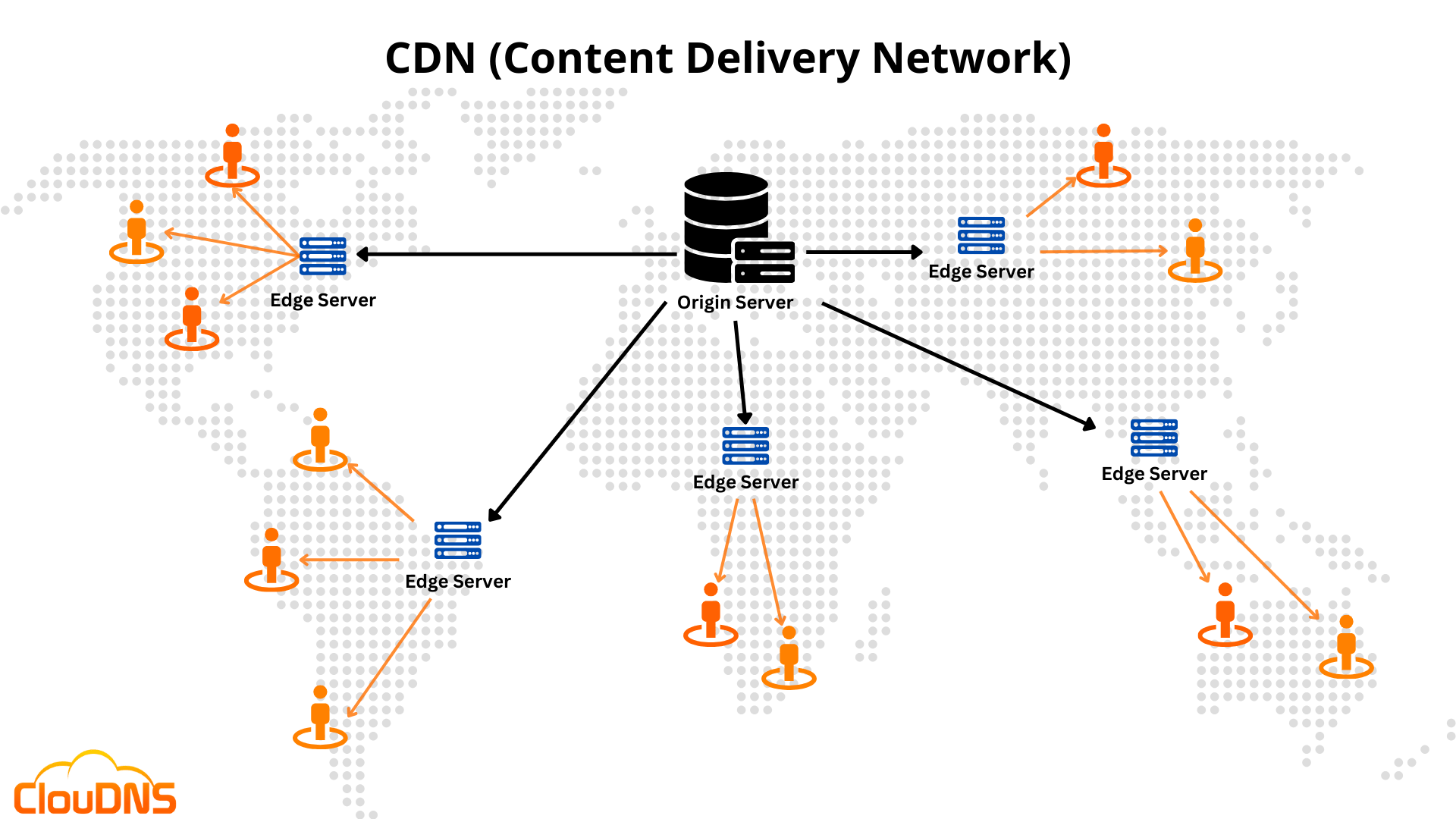
A Content Delivery Network (CDN) helps by storing content on servers across different locations. When someone requests a file, like an image or video, the CDN serves it from the nearest server. If it's not cached yet, the CDN fetches it from your origin server, stores it locally, and delivers it. Next time, it’s ready to go fast.
CDNs are great for static content (images, videos, HTML, CSS), and with the right setup, they can even handle some dynamic content.
A common use case? Think of a social media app like Instagram. You’d use a CDN to serve profile pictures instantly, no matter where the user is.
In short: if you care about speed, scale, and user experience, a CDN is often worth it.
Why Do We Need CDNs?
Modern websites and applications serve users across the globe, but often host content in just one or a few regions. This geographic gap causes latency, especially for users far from the origin server.
📍 Example:
Imagine your website is hosted in Mumbai. Users from Chennai, Delhi, or Kolkata would need to wait for their requests to travel all the way to Mumbai and back. Not ideal for performance or user experience.
Now, introduce a CDN: content gets cached on edge servers in nearby cities. So a user in Chennai can fetch content from a local CDN node much faster, less load on the main server.
How a CDN Works
A CDN caches and serves content (like images, HTML, JS, CSS, or even API responses) from strategically located Points of Presence (PoPs). These PoPs contain edge servers that act as mini versions of your origin infrastructure.
When a user requests content:
The CDN checks if the content is cached on a nearby edge server.
If yes, it serves it directly fast.
If not, it fetches the content from the origin, stores it at the edge, and serves it.
Next time, it's already there, ready to go.
Routing Requests to the Right Server
To direct user traffic efficiently, CDNs use different routing techniques:
DNS-based routing: Each PoP has a unique IP address. DNS returns the IP of the closest PoP.
Anycast: All PoPs share the same IP. The network automatically routes requests to the nearest server based on location and availability.
Common CDN Use Cases (Especially in Interviews)
In system design interviews, CDNs often come up when discussing how to serve static media—like images or videos efficiently. A classic example is a social media app (like Instagram) using a CDN to cache and deliver user profile pictures quickly, no matter where the user is.
1. Not Just for Static Files
While CDNs are typically used for static assets—images, videos, JavaScript, etc.—they can also handle dynamic content that doesn’t change often. For instance, a blog post updated once a day can be cached to improve load times without serving stale content.
2. Caching API Responses
If your API endpoints return the same data to many users (e.g., trending posts or product listings), you can cache those responses using a CDN. This reduces backend load and speeds up response times.
3. Cache Eviction & Invalidation
Like any cache, CDNs don’t hold onto data forever. You can control how long content stays cached using TTL (Time To Live), or explicitly invalidate the cache when the underlying data changes. This helps keep content fresh without sacrificing performance.
Modern CDN Capabilities
CDNs have evolved far beyond just caching static files. Here's what they can do today:
Dynamic Content Caching: Content that doesn't change frequently (like blog posts or product pages) can still be cached.
API Caching: Repeated API responses can be cached to reduce backend load and improve response times.
Edge Optimizations: CDNs can minify JavaScript or convert images (e.g., to WebP or AVIF) on the fly.
TLS Termination at the Edge: CDNs handle secure HTTPS connections at the nearest edge server. This reduces the time it takes to establish a secure connection (especially with TLS 1.2 or 1.3).
DDoS Protection: With globally distributed infrastructure, CDNs can absorb and deflect massive traffic spikes caused by denial-of-service attacks.
Improved Availability: If one PoP goes down, others can continue to serve traffic, keeping your site up and running.
By now, you should have a clear understanding of what a CDN is, why it exists, and how it helps developers build better, faster, and more secure applications.
To sum it up:
A CDN is a geographically distributed network of servers that cache and deliver content from the location nearest to the user—making websites load faster, reducing latency, improving security, and keeping things running smoothly at scale.
In a world where user experience and performance are non-negotiable, CDNs are no longer optional, they’re essential.
Loved this deep dive? Hit a like ❤️
For more simple explanations, useful insights on coding, system design, and tech trends, Subscribe To My Newsletter! 🚀
If you have any questions or suggestions, leave a comment.
Follow me on LinkedIn, X and Instagram to stay updated.
I hope you have a lovely day!
See you next week with more exciting content!
Signing Off,
Scortier